
In most cases, yes, you can get an MRI with dental implants. Titanium and zirconia, the materials implants are made from, aren’t magnetic the way iron or steel is, so implants are generally compatible with MRI. They can distort the image close to the jaw, and some dental work, such as magnet-retained denture attachments, needs special attention, so always tell the imaging team about your implants and let them make the call.
That matches what we cover in our roundup of dental implant myths vs. facts. Here’s the fuller picture: why implants are generally not a problem, when they can matter, and how CT scans, dental X-rays, and airport screening compare.
Why are dental implants generally compatible with MRI?
An MRI (magnetic resonance imaging) scanner uses a very strong magnet and radio waves to create detailed pictures of the inside of the body. The main safety concern with metal is ferromagnetic material, meaning metals such as iron and many types of steel that a magnet pulls on strongly.
Dental implants are different:
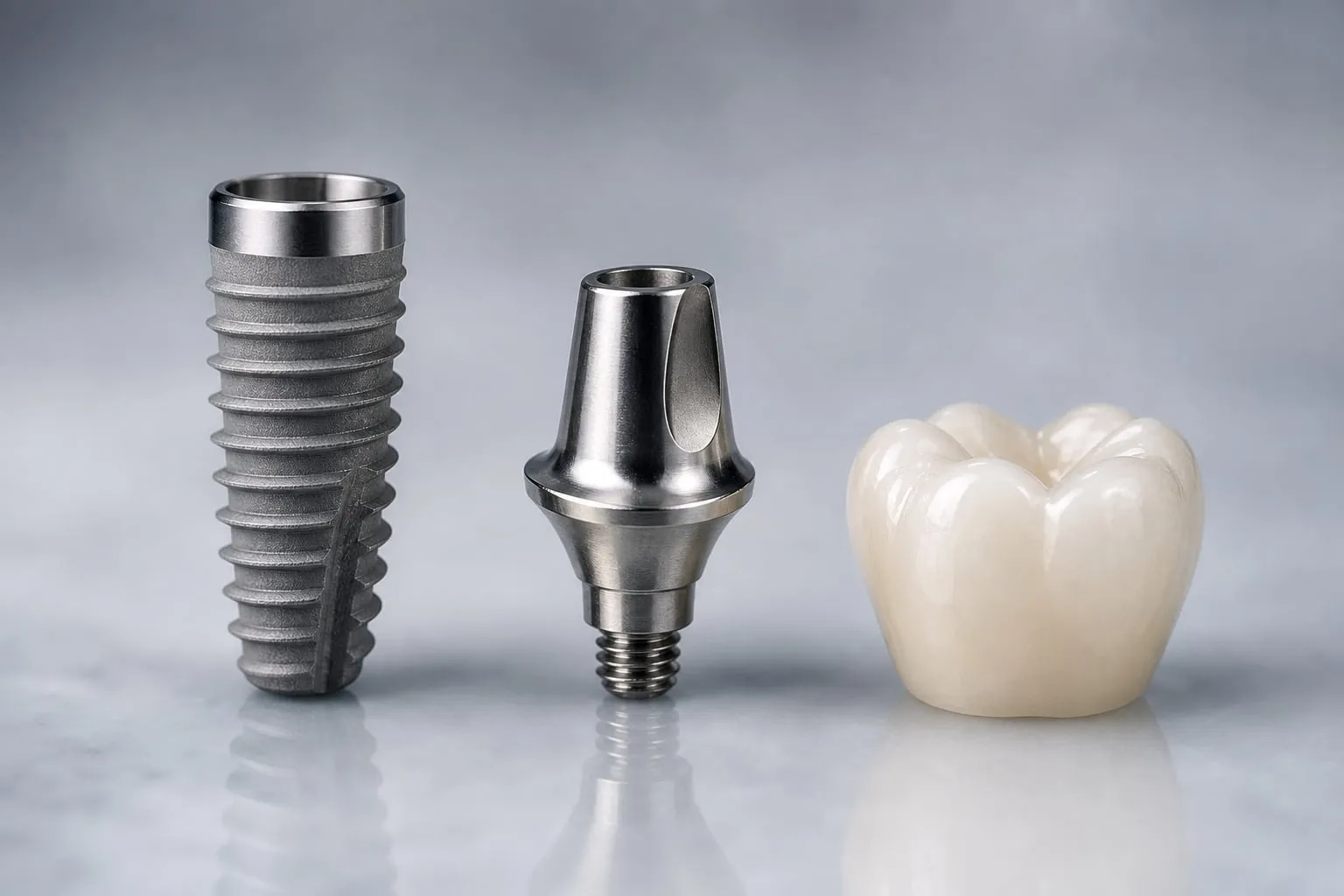
- Titanium, the most common implant material, isn’t ferromagnetic. A magnet doesn’t pull on it the way it does on steel.
- Zirconia is a ceramic and contains no metal at all.
- An implant is anchored in bone. During healing, bone grows onto its surface and bonds with it, a process called osseointegration. It’s a small, fixed part, not a loose object.
The abutment (the connector that rises through the gum) is commonly titanium or zirconia too, and the crown on top is often ceramic. Our guide to the parts of a dental implant shows how the pieces fit together, and titanium vs. zirconia dental implants compares the two implant materials.
That’s why imaging teams generally treat titanium and zirconia dental implants as compatible with MRI. They still want to know the implants are there, for the reasons below.
What is an MRI “artifact”?
An artifact is a flaw in a scan image that doesn’t reflect what’s actually in your body. Metal disturbs the magnetic field right around it, so on an MRI it can show up as a dark blank patch, a bright edge, or warped shapes close to the metal. Think of it as a smudge on one part of a photograph.
An artifact doesn’t mean the implant is damaged or that anything harmful happened. It means the small area near the metal is harder to see clearly. How large it is depends on the type and amount of metal, the scanner, and the settings used. In general, titanium tends to cause less distortion than steel, and zirconia tends to cause very little.
When does it matter most?
Artifact is a local effect, so it matters most when the area being scanned is close to your teeth:
- Head and neck scans, such as images of the jaw, tongue, salivary glands, sinuses, jaw joint, or nearby parts of the face, are where an implant is most likely to get in the way.
- Scans of distant areas, such as a knee, the lower back, or the abdomen, are generally not affected by dental implants.
For head and neck scans, the imaging team may adjust their settings or approach. That’s their call, based on what they need to see.
What should you tell the MRI team?
Before an MRI, you’ll typically fill out a safety questionnaire about metal and devices in your body. Dental work belongs on that list, even if it feels minor. Mention:
- Dental implants: how many, roughly where, and what they’re made of if you know
- Implant-supported dentures, especially any that snap on with magnets
- Removable dentures or partials, which you’ll usually be asked to take out before the scan
- Braces or a fixed wire retainer behind your teeth
- Crowns and bridges, including any that contain metal
If you don’t know what your implants are made of, your dental office can usually check your records. The radiology team decides whether and how the scan goes ahead, and their screening always takes priority over anything you read online.
What about magnet-retained dentures?
Some implant-supported dentures snap onto attachments on the implants. Many use mechanical snap-style attachments or a bar, but some are held in place with small magnets. In that design, a magnet sits inside the denture and a small metal cap, often called a keeper, is fixed to the implant.
Both parts contain magnetic material, so they need more attention than a plain implant:
- The denture itself is generally taken out before the scan, and a strong MRI field can weaken its magnets.
- The keepers stay on the implants. They can be affected by the scanner and can cause much larger distortion on head and neck images.
If you can, tell the imaging team about magnetic attachments well before the appointment. Depending on the scan and the scanner, they may want more details, and in some cases they may ask whether the attachments can be removed first, which your dentist would arrange. The radiology team makes the decision.
Can you have a CT scan, CBCT, or dental X-rays with implants?
Yes. These scans use X-rays rather than magnets, so there’s no magnetic pull on anything in your mouth.
Metal can still affect the picture. On a CT scan, it can cause bright and dark streaks near the implant, another kind of artifact. The person reading the scan takes that into account, and implants don’t prevent the scan.
In dentistry, X-rays are routine with implants. Implants show up bright white on a dental X-ray, which is how your dentist checks the bone level around them over the years. A CBCT scan (cone beam computed tomography, a 3D X-ray of the jaw) is a core part of implant planning; see what a CBCT scan is and why implants need one and our page on 3D imaging and implant planning.
| Type of screening | How it works | Do implants prevent it? | What to know |
|---|---|---|---|
| MRI | Strong magnet and radio waves | Generally not | Can blur images near the jaw; always tell the team |
| Medical CT scan | X-rays | No | Metal can cause streaks near the implant |
| Dental CBCT scan | X-rays, in 3D | No | Routine for implant planning and checks |
| Dental X-rays | X-rays | No | Used to monitor the bone around implants |
| Airport screening | Metal detectors and body scanners | Generally not | Implants usually don’t cause issues |
General information only. Imaging teams and screening equipment vary.
Do dental implants set off airport metal detectors?
Generally not. Implants are small titanium or ceramic parts inside the jawbone, and they usually don’t cause issues at security screening. Equipment and settings vary, so no one can promise it never happens, but implants generally aren’t a reason to worry about travel. If a screener ever does ask, you can simply explain that you have dental implants.
The bottom line
Titanium and zirconia dental implants aren’t magnetic like iron or steel, so they’re generally compatible with MRI and don’t stand in the way of CT scans, dental X-rays, or travel. They can blur images close to the jaw, and magnet-retained denture attachments need special attention, so always list your dental work on any imaging questionnaire and let the radiology team decide. If you’re considering implants, our dental implants overview explains how they work, and you can request a free consultation or call (949) 773-4170 to ask what yours would be made of.
This article is general education, not medical advice. Whether and how an MRI or other scan goes ahead is decided by your physician and the imaging team, so tell them about all of your dental work and follow their instructions.